“Unlisted” YouTube links keep leaking. Each week another headline shows how a simple URL can expose training videos, investor updates, or product demos, according to OpsMatters.
So we tested the services that build security into their DNA—encrypting every stream, locking embeds, and stripping ads—while still costing less than a typical SaaS lunch stipend.
In this guide you’ll see our evidence-based ranking of 11 standout platforms, learn when to choose each one, and spot the trade-offs to weigh before you hit upload.
How We Picked and Scored
Before we crowned any winners, we set the bar. Every platform had to stream videos with encryption, serve them in an ad-free player, and give you at least one switch to lock down access (think passwords, domain whitelists, or token links). We capped entry pricing at about $70 a month because “affordable” should still feel like a line item, not a board-approved capital expense.
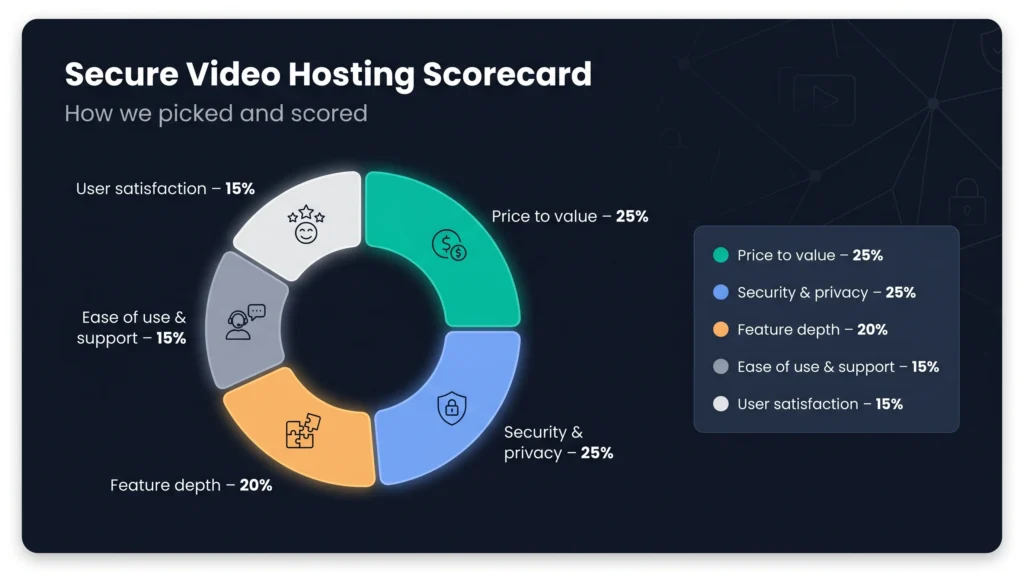
Once a service cleared those gates, we graded it on five equally tough factors, each mapped to the questions teams ask when budgets get tight.
- Price to value (25 percent). How much storage, bandwidth, and branding freedom do you get for your first dollar? Generous limits and low overage fees scored high.
- Security and privacy (25 percent). We dug into whitepapers and dashboards to see who offers hardened HLS, multi-DRM, dynamic watermarks, or audit logs a compliance officer can trust.
- Feature depth (20 percent). From analytics heatmaps to LMS plug-ins and live streaming, extra capabilities earn points because they save you juggling add-ons later.
- Ease of use and support (15 percent). A clean interface and responsive help desk matter when you’re racing a launch day. We balanced firsthand trials with public user comments.
- User satisfaction (15 percent). Star ratings from G2 and Trustpilot give us a quick gut check on reliability, uptime, and how often promises meet reality.
List of Best Secure Video Hosting Platforms

We weighted the scores, tallied the numbers, and built a matrix that surfaces clear front-runners instead of a muddled grab bag of “top picks.” The result: an ordered list you can trust, served with the context you need to choose the best fit for your risk profile and wallet.
1. Spotlightr: secure video marketing on a startup budget
Spotlightr wins the value game by a landslide. At $13 a month you get encrypted streaming, 25 hosted videos, and a white-label player that never shows an ad or random “next up” thumbnail. For many creators the raw math closes the Vimeo-versus-Wistia spreadsheet debate. The guide 9 Best Wistia Alternatives For Video Hosting In 2025 – Spotlightr notes Wistia’s current entry plan lands at $99 a month for 250 GB of storage and 1 TB of bandwidth, so Spotlightr’s $13 starter tier delivers the same professional polish at a fraction of the cost.
Security is not an afterthought. Every playback request travels through HLS encryption with rotating keys, so browser extensions that scrape raw MP4s see only fragments. Add domain whitelisting or one-time passwords, and a leaked URL dies quietly outside its approved home. It is not Hollywood DRM, yet for most courses or sales funnels it closes the easy doors pirates use.
Where Spotlightr shines is engagement. You can drop a quiz, email gate, or call-to-action button right inside the timeline without writing code. Each interaction pipes into your CRM or Zapier flow, so a viewer who finishes 90 percent of a demo can trigger an automated follow-up. Heat-map analytics show where people rewind or bail, letting you tighten scripts instead of guessing.
Drawbacks exist. If you sell ultra-premium lessons that attract determined pirates, the lack of multi-DRM could push you toward VdoCipher later. Storage also scales in jumps; you move from 25 to unlimited videos at $21 a month, so budget for growth. For small teams that need secure delivery and marketing muscle today, Spotlightr delivers more punch per dollar than any other pick on our list.
2. Wistia: branded player and deep analytics for client-facing videos
When image matters as much as security, Wistia steps in. The player arrives immaculate, stripped of outside logos and distractions. You can tweak the color to match your brand, swap the play-button style, and decide exactly what appears when the credits roll. Viewers never feel like they have been kicked back to a public video site; they stay immersed in your story.
Privacy controls are straightforward. Lock a video with a password, restrict embeds to your domain, or put everything behind single sign-on if your company already uses Okta or Microsoft Entra. There is no DRM, but for most marketing and thought-leadership clips the mix of domain locks and unlisted links keeps accidental leaks at bay.
Wistia’s standout trait is audience intelligence. Turnstile email gates collect leads right inside the video, and per-viewer heatmaps reveal which prospects replay the pricing slide three times versus those who bounce at 30 seconds. That data flows into HubSpot, Salesforce, or Marketo in real time, so sales sees intent the moment it sparks.
Pricing starts at $79 a month for 50 videos. The rate feels higher than Spotlightr, yet many teams accept the cost because the refined viewer experience often converts. If your key metric is qualified leads rather than raw storage capacity, Wistia’s branding polish and granular analytics justify the premium.
3. Vimeo: flexible privacy with familiar polish
Many teams choose Vimeo for peace of mind. The player looks premium right out of the box, streams clean 4K, and never slips an ad or unrelated recommendation into your viewer’s line of sight.
On the privacy front, Vimeo covers the usual bases. Flip a switch to hide a video from public listings, add a password, or lock embeds to your domain so the clip refuses to play elsewhere. Those controls suit internal trainings, investor updates, or gated course modules where link sharing—not outright piracy—is the main threat.
Storage is generous for the price. The Starter tier costs $12 a month and includes 60 videos per year, while the Standard plan doubles that cap to 120 videos and unlocks deeper player customization. If you host client footage or a growing tutorial library, that headroom saves you from moving files or juggling multiple accounts later.
Collaboration is another draw. Teammates can leave time-coded comments directly on the video frame, turning review cycles into quick dialogues instead of email threads. Post-production shops and in-house creative teams rely on this feature daily.
The drawback appears when you need iron-clad anti-piracy. Full DRM sits only in Vimeo’s Enterprise contracts, which start well above our affordability ceiling. If your content has high black-market value, you will graduate to a service like VdoCipher. For marketing reels, customer stories, and thought-leadership webinars, Vimeo remains a versatile, budget-friendly choice.
4. Vidyard: instant intel for one-to-one sales videos
Vidyard is not built to store your entire video library. Its mission is simple: help a rep record a personal clip, hit send, and know the moment a prospect presses play. That real-time feedback loop turns video from a passive asset into an active conversation starter.
Security begins with individualized links. Each viewer receives a unique URL tied to their email address, so you always know who watched and for how long. Add an optional password and the link becomes useless if it reaches the wrong inbox. For internal rollouts, you can require company SSO to keep recordings sealed inside the organization.
The payoff appears inside your CRM. A prospect finishes 80 percent of a demo; HubSpot or Salesforce lights up with that engagement score while your coffee is still hot. Reps call at the perfect moment, turning curiosity into booked meetings. Personalization features lift results even higher: overlay the viewer’s name or company logo inside the video to make the message feel handcrafted instead of canned.
Cost scales per seat. At $59 a month, a single user unlocks full video analytics, branding control, and performance tracking. Larger sales teams jump to the Teams tier, which can feel pricey but pays for itself if faster deal cycles move just one extra contract across the line each quarter.
If you need a vast on-demand catalog, Vidyard is not your platform. For teams measured on pipeline velocity and closed-won revenue, the instant “video viewed” ping is worth every penny.
5. SproutVideo: lock it down without a learning curve
SproutVideo is the quiet achiever in this lineup. At $10 a month you get ad-free streaming, a white-label player, and privacy toggles granular enough to satisfy even the jumpiest compliance officer, all wrapped in a dashboard you can master before lunch.
Need to share a training film only with contractors in Chicago? Turn on geo-restriction, list the United States, and limit access to your partner’s IP range. Want to trace leaks? Activate dynamic watermarks that float the viewer’s email across the frame every few seconds. These controls sit a click away, not buried in developer docs.
SproutVideo also lets you spin up a branded video portal, a mini site where employees log in, browse playlists, and track their own progress. It feels like a private streaming hub yet takes minutes to configure. For teams without an LMS budget, that feature alone can justify the subscription.
Performance holds up well. The platform routes streams through a global CDN, and our playback tests from Europe and Asia started in under two seconds. Analytics cover the essentials: views, completion rates, and which IP addresses hit play, making it easy to verify training compliance.
The drawback is marketing flair. You get basic lead forms but no in-video quizzes or advanced CRM hooks. If conversion funnels are the goal, Wistia or Spotlightr win. If your priority is “only the right eyes see this, and setup must be painless,” SproutVideo is the straight-shooting choice.
6. Dacast: live streams and pay-per-view revenue in one dashboard
Dacast stands out because it treats live and on-demand video as equals. Fire up a keynote, a concert, or a town-hall stream, and the recording lands in your library seconds after the applause. No exports, no third-party tools; just mark it private, set a price, and share the link.
Security relies on tokenized HLS streams and referrer locks, so only pages you approve can host the player. Add a password or place the event behind your login system, and casual link leaks lose their punch. Need studio-grade DRM for a film premiere? It is available as an add-on, though most businesses never flip that switch.
The built-in paywall is Dacast’s headline feature. You can set rental prices, bundle replays into a weekend pass, or launch a monthly subscription, all without bolt-on ecommerce plugins. Viewers pay inside the player, revenue routes to your account, and you keep full branding control. For creators who sell tickets or training sessions, removing checkout friction lifts conversion on day one.
Pricing starts at $39 a month with an annual bandwidth bucket. The model feels odd if you are used to “unlimited” plans, but it saves money when traffic spikes only on event days. You can also choose an Event package, 6 TB for $63 a month billed annually, perfect for a series of conferences or pay-per-view fight nights.
The interface leans utilitarian. Setting up adaptive bitrates or RTMP ingest takes more clicks than Vimeo Live, and newcomers may lean on the detailed help docs. Yet the trade-off is flexibility. Few platforms under $100 a month let you stream live, host replays, and charge viewers, all while keeping your logo front and center.
7. VdoCipher: bullet-proof DRM for courses and indie OTT
When revenue depends on keeping videos off pirate sites, VdoCipher draws the line. The platform wraps every stream in Widevine and FairPlay DRM, the same protection Netflix trusts, then adds a moving watermark keyed to each viewer’s email. Even common screen-recording tools show a black box instead of your lecture or film.
Setup is friendlier than the studio-grade label suggests. Upload a file, copy the embed code with its one-time playback token, and drop it into WordPress or your LMS. The token expires within minutes, so even if someone grabs the source code, the link dies before it can spread.
Pricing starts at $129 a year and covers about 500 GB of bandwidth, enough for a mid-sized course launch. As your catalog or audience grows, you scale bandwidth rather than jumping to an expensive enterprise tier.
There are trade-offs. The player offers basic branding tweaks but no in-video quizzes or email gates, so you will need external tools if marketing interactivity is crucial. Still, for creators burned by torrents or messaging-app leaks, the confidence of true multi-DRM is worth sacrificing a few bells and whistles.
8. Gumlet: developer-friendly video API with multi-DRM on tap
Picture Gumlet as a cloud toolkit for secure video. You upload an MP4 to the API, and moments later the service has transcoded, encrypted, and pushed adaptive streams to edge servers worldwide. Pricing starts at $10 a month, giving you a starter bundle of storage and streaming minutes that scales with use.
Security arrives in layers. For basic protection, sign each playback URL so it expires after a set time. For full studio-grade lockdown, turn on Widevine, FairPlay, and PlayReady DRM, no separate vendor or long contract required. Because Gumlet is API-first, you can mix these controls per asset: a public teaser stays token-gated, while the paid course behind it gets DRM.
Performance telemetry is another highlight. A real-time dashboard shows startup delays, rebuffer ratios, and average bitrate by country and ISP. If viewers in São Paulo stall, you spot it before support tickets flood in. That insight lets engineering teams tune delivery and trim CDN costs.
Approachability is the trade-off. Non-technical users may prefer Vimeo’s polished CMS, but product teams shipping mobile or OTT apps will value the SDKs and webhook events. For them, Gumlet offers secure, scalable video infrastructure without the billing surprises that haunt DIY stacks.
9. Cloudflare Stream: token-gated video that plugs into your security stack
Cloudflare Stream treats video like any other edge asset on its global network. Upload a file or push from an S3 bucket, and the service returns an asset ID plus a JSON Web Token recipe. Your app generates a short-lived token for each viewer, the player validates it at the edge, and unauthorized requests never reach the origin. No manual CDN configs, no extra firewall rules.
Because Stream is API-only, developers wire it into existing identity providers. A viewer logged in with Okta, Auth0, or your custom JWT service can receive a playback key that expires in minutes. Audit logs for every play, pause, and scrub export to your SIEM through Logpush, satisfying compliance teams that need forensic trails.
Pricing is straightforward: $5 per 1,000 minutes stored and $1 per 1,000 minutes delivered. Spiky usage—such as quarterly town halls or viral user-generated clips—will not trap you in plan overages. And with points of presence in more than 300 cities, start-up time stays low on every continent.
The flip side of that power is minimal UX polish. There is a bare-bones dashboard for quick tests, but real projects live in code. If you want a drag-and-drop CMS, look elsewhere. If your team already builds on Cloudflare Workers or needs developer-controlled delivery, Stream fits cleanly and keeps your SecOps lead satisfied.
10. Muse.ai: AI-powered search that makes your archive bingeable
Video libraries grow fast. After a few webinars and all-hands recordings, good clips hide in forgotten folders. Muse.ai solves the problem by auto-transcribing every upload, then letting viewers search inside the spoken words. Type “quarterly forecast” and jump to the 37-second mark where the CFO said it.
Privacy basics come standard: unlisted links, password managers, expiring share URLs, and geo-blocking on the Plus plan. The player stays clean, streams up to 4K, and blends into any site with a quick iframe. Because Muse.ai is light, pages load quickly on mobile and desktop, and the AI search still works.
Pricing is flat and storage-based rather than viewer-based. At $10 a month you receive 100 GB of storage and unlimited bandwidth, a sweet deal if file count matters more than traffic. Teams that upload daily stand-ups or classroom sessions value that predictability.
There are gaps. Analytics remain basic, limited to views and completion rates, with no per-viewer heatmaps yet. Domain-restricted embeds sit on the roadmap but are missing today. For most internal knowledge bases or member-only communities, transcript search far outweighs those gaps. Muse.ai turns a cluttered video dump into a clip-on-demand library your team will use.
11. Uscreen: launch your own “mini-Netflix” without writing code
Uscreen bundles secure hosting, a storefront, and native OTT apps into one subscription. Upload videos, drag them into themed collections, set a subscription price, and your streaming service is live, complete with credit-card checkout, watchlists, and mobile push notifications.
Security begins at the login wall. Every viewer needs an account, and you can cap concurrent devices to stop password sharing. Streams run over encrypted HLS on a global CDN, while optional watermarks deter screen-capture leaks. It is not multi-DRM, but for most fitness classes, coaching libraries, and indie documentaries the member gate and device limits prove enough.
The money side is turnkey. Coupons, free trials, gift cards, and in-app purchases ship out of the box. Revenue lands in your Stripe or PayPal account within days, and Uscreen takes no cut beyond the flat monthly fee of $49 for the starter tier. Compare that to platforms that skim 10 percent of every sale and the math tilts quickly in Uscreen’s favor.
Branding is straightforward. Pick a theme, upload logos, and tweak colors. Higher plans even generate fully branded apps on iOS, Android, Roku, and Apple TV, and Uscreen handles App Store submissions and updates, saving months of development time.
Downsides revolve around flexibility. You work within Uscreen’s templates, so pixel-perfect designers may chafe at limitations. If you later outgrow the platform, migrating subscriber data to a new service requires coordinated CSV exports and customer emails.
For creators focused on recurring revenue, and who prefer marketing content to juggling plugins, Uscreen is a fast road from raw video files to a polished, paywalled streaming business.
Conclusion
Choosing the right video host comes down to balancing security needs, viewer experience, and budget. Use the scorecard above to match each platform’s strengths to your specific goals, and you’ll protect your content without overpaying.