
Suppose you’ve just published a new blog or story and want the whole world to see it. How do you make people—and search engines—aware of your fresh content? This is where Ping Submission Sites come in. Pinging is a simple method of notifying the internet that your website or blog has new content. It’s like waving your hand in a crowded hall to grab attention.
In this guide, we’ll explain what ping submission websites are, how they work, and why they are essential for SEO. You’ll also learn a step-by-step method to use them safely and effectively, even if you’re not a tech expert. By the end, you’ll know how to make sure your new content gets noticed quickly and efficiently.
What Is Ping Submission & How It Works
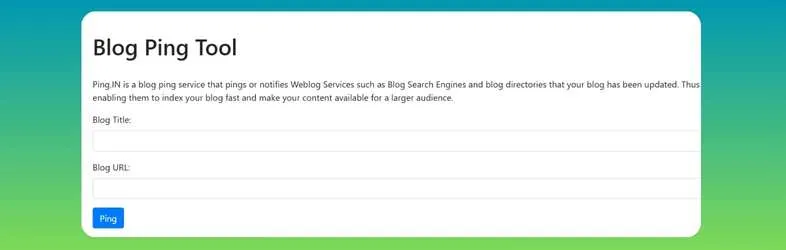
In SEO, ping submission is a method used to notify the search engines that your website or blog has been updated with new content. This helps speed up the indexing process, so your new pages or posts appear in search results more quickly. Let’s break it down clearly:
- A ping is a signal sent from your website to search engines or ping services.
- The signal tells them: “Hey, I have new content. Please come and index it.”
- It’s commonly used for blogs, news sites, or any site with frequently updated content.
Why Ping Submission is Important for SEO
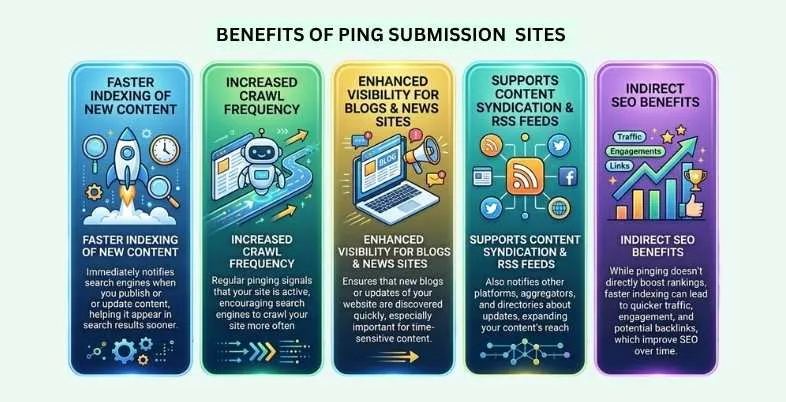
- Faster Indexing of New Content – Ping submission immediately notifies search engines when you publish or update content, helping it appear in search results sooner.
- Increased Crawl Frequency – Regular pinging signals that your site is active, encouraging search engines to crawl your site more often.
- Enhanced Visibility for Blogs & News Sites – Ensures that new blogs or updates of your website discovered quickly, especially important for time-sensitive content.
- Supports Content Syndication and RSS Feeds – These sites also Notifies other platforms, aggregators, and directories about updates, expanding your content’s reach.
- Indirect SEO Benefits – While pinging doesn’t directly boost rankings, faster indexing can lead to quicker traffic, engagement, and potential backlinks, which improve SEO over time.
Do Ping Sites Still Work in 2026?
Though the entire concept of search has evolved with AI-based indexing and other techniques, pinging is still considered a secondary signal that can play an important role in bot crawling. Below are some considerations for pinging in 2026.
- Crawl Trigger: Pinging essentially serves as a digital tap on the shoulder, notifying bots to crawl the website. It may not assure a good ranking, but it significantly reduces the delay between posting and the first crawl.
- Directory Coverage: The ping submission sites are designed to broadcast your URLs on various directories that may be out of reach of the sitemaps of the website.
- Spam Sensitivity: Modern search engine algorithms are extremely sensitive to spam. Hence, you need to limit your submissions to 2-4 per URL.
- Quality Consideration: Quality and relevance are of extreme importance for modern search engines. They would ignore the URL for ping if the destination page fails to fulfill the criteria of quality and relevance.
- Secondary Signal: Pinging should be used as a secondary technique, not as a primary SEO strategy for indexing. It works best if accompanied by internal linking and an XML sitemap.
70+ Working Free Ping Submission Sites List (High DA)
How do Ping Submission Sites Impact SEO?
Pinging, then, does it matter anymore? Yes, it does though it is less obvious this time. Now let us consider the real impacts.
The Main Metric: Time to Index
The primary impact of pinging is the speed of appearance of a new page in search results. It is the duration it takes after publishing a page before it gets to the search results.
The easiest method by which you might test this is as follows:
- Create a new post on the blog and post it.
- As soon as you are published, enter the entire URL in Google as follows: site: yourwebsite.com/ your new post-URL. Most likely, you will get a message that says No results found – that is because the page is not indexed yet.
- The next step is to ping the new URL by using an esteemed ping service.
- Monitor the search results of your URL after every few hours.
The primary impact of pinging is the speed of appearance of a new page in search results. It is the duration it takes after publishing a page before it gets to the search results.
Indirect SEO Benefits
There are also indirect benefits of pinging that are more difficult to quantify but are beneficial.
- Crawl Frequency: The more you ping new content the more the search engines are trained to visit your site on a regular basis. The more a site is crawled, the faster its new content is indexed with time.
- Other Source Traffic: Other Sources When a ping server informs services about your new post, such as a news aggregator, they may display it on their websites. This will be able to direct a little bit of direct traffic to yours which is a good message to search engines.
- Broad Web Reach: Pinging not only delivers your update to large search engines, but also to numerous other places as well. This distributes your content on the Internet. It is as much as putting a flyer on numerous community boards, not only the main one in town.
How Safe is Ping Submission for Off-Page SEO?
The Danger of Over-Pinging
This is the greatest mistake that people commit. Ping spamming or over-pinging occurs as a result of sending hundreds or thousands of pings to the same URL within a limited time.
Suppose you are making a new announcement. You make one call to your friend to inform him. That’s fine. However, when you made 500 calls in the next hour with the same message to your friend, he/she would be irritated and may block you.
The same happens with ping servers and search engines. When they receive numerous pings on your site with the same page, they will be regarded as spam. They can disregard any of you pings, or even spam your site.
- The Golden Rule: Ping when you have out. One ping per update is enough.
The Danger of Using Low-Quality Ping Sites
When you search free ping submission sites you will find a lot of sites claiming to ping your URL to thousands of servers. Be careful with these.
Ping serves dead or useless servers.
- They are able to associate your site with a bad neighborhood of other spammy sites.
- They are just as likely gathering your URL and email to use in their spam lists.
It is more damaging to use these sites than beneficial. It is like telling your troublemaker about your good news. The company you maintain will be used to judge you.
How to Stay Safe:
- Use popular services: Use popular and paid-friendly ping. Ping-O-Matic is not a bad option as it is managed by the same company that develops WordPress.
- Go with an in-built option of your site: The most safe method is to have your CMS (e.g. WordPress) ping automatically. It does so in the right manner and pings only once when you post or update.
- Ping on-need basis: Ping an URL during your first time of publication or when you add some significant changes to it, and not because of a typing mistake. Do not ping your home page or the same page many times.
How to do Ping Submission(Step-by-Step Guide)
Unless your site is created using WordPress, or you wish to inform search engines that you have made specific changes in a certain page, then you could use ping submission sites.
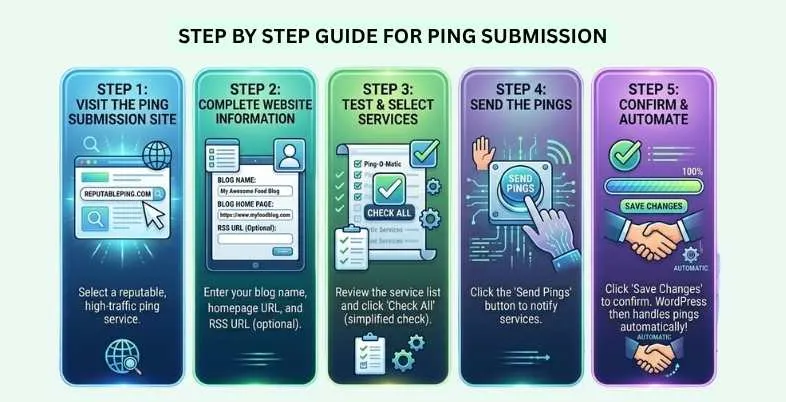
Step 1: Visit the Ping submission site.
Find a highly reputable ping submission website.
Step 2: Complete your Web Site Information.
You’ll see a simple form. Enter the following in each field:
- Blog Name: Name of your site or blog. (e.g. My Awesome Food Blog).
- Blog Home Page: This is the entire URL of your site (including the prefixes, such as, http: or https:). (e.g. https://www.myawesomefoodblog.com).
- RSS URL (Optional): You can enter the RSS feed URL in case you know it. Otherwise, this you can leave blank.
Step 3: Test the Services to Ping.
Under the form, there will be a long list of services. Here is where Ping‑O-Matic will tell you about your update. To make it simple, you can simply maintain the check all. The list is maintained by Ping-O-Matic.
Step 4: Send the Pings
Click the button entitled Send Pings.
Step 5: Wait for Confirmation
Press the button of Save Changes at the bottom of the page. That’s it! You’re all set. It is all automatic now, and every time you post a new post or make an update to an old one, WordPress will ping all the services you have listed in that box. You need never think about it again.
Bulk Ping Submission: Pros, Cons & Best Practices
Bulk ping submission sites refers to the process of making pings to a large number of URLs usually with some special tool. You do not need to ping only a single new blog post and you are able to ping 50 or 100 pages of your website simultaneously. It may be a strong one, though you must be very careful. To the majority of the website owners it is unnecessary and may be dangerous.
Pros of Bulk Ping Submission:
- Saves Time: The greatest advantage is speed. Pinging all 50 pages manually would be slow in case you have just created a new section of your site. A bulk tool is capable of doing it in minutes.
- Useful After a Big Change: Useful in special cases can be bulk pinging. As an example, suppose you have changed your entire site into a new name (you used myoldsite.com, and now yournewsite.com). You could ping all your new URLs simultaneously so that the search engines would be informed about the new name as soon as possible.
Cons of Bulk Ping Submission (The Dangers)
- Can trigger search engine penalties (spam signals).
- Wastes crawl budget on the same URLs.
- May cause temporary boost then ranking drop.
- Increases risk of duplicate/thin content exposure.
- Some services are spammy or unreliable.
- Possible blacklisting if overused.
Best Practices for Bulk Pinging
To keep the risk minimal in the case when you really need to use a bulk ping tool, the following rules should be followed.
- Avoid it when possible: The easiest thing to do is to avoid bulk pinging. WordPress automatically pings new posts which is safer and it is usually sufficient.
- Sparsely: Do not use a bulk ping tool in your day to day business. Only use it once, when there is a special occasion such as the launch of a site or its movement.
- Ping new URLs only: Do not ping the entire site again and again. In case you need to work with a bulk tool, only new URLs should be sent.
- An alternative suggestion: provide a sitemap. In lieu of bulk pinging, developing an XML sitemap. One of the files is a sitemap which contains all the URLs of your site.
Ping Submission & Content Indexing Tools
One of the tools that can assist people to view your content is ping submission. It is not as dead as it still functions, however, there are some newer and more powerful tools, particularly Google and Bing. These tools are various and are used in a good plan.
The Modern Power tools: Webmaster Tools.
Search engines can be communicated with best through their own platforms.
- Google Search Console: This is a free service provided by Google and it is a necessity to any site owner. The URL Inspection Tool is a tool available in the search console. You can copy and paste any page on your site, and Google will indicate to you what is the current status of the page. There is also a button which says Request Indexing.
- Bing is the second-largest search engine, and its platform is similar to that of Bing Webmaster Tools. It has a URL submission option whereby you can request Bing to crawl your pages quickly.
The Blueprint of Your Site: The XML Sitemap
This we have said in the preceding section, but it is worth repeating. XML sitemap is a file which displays all the pages in your web site. It causes you to list all your important pages.
This file (many web building tools do it automatically) is uploaded to Google Search Console and Bing Webmaster Tools. This is the most appropriate method to ensure that search engines are aware of all the pages in your web site, even the old pages that are rarely updated.
So, How Does Pinging Fit In?
Consider all these tools as a team.
- XML Sitemap is similar to team captain: It informs search engines of the entire scheme of your entire site.
- Google has a star player that is the Request Indexing: In case you have a particularly important page, and you want to have it displayed immediately, then you submit it directly.
- Ping Submission: The announcer. It broadcasts a fast message to numerous locations- search engines, directories and other web sites hence your new material is recognized within a short time.
A quality SEO plan incorporates all the three tools. Your sitemap is made, the most important new pages are request indexed, and your automatic pinging system sends instant notifications on each new post.
Tips to Use Ping Submission Sites Safely & Effectively
To achieve maximum out of the ping submission sites without any dangers, it is better to follow a few dos and don’ts. The following is a hastily compiled checklist.
The Do's
- the inbuilt ping-back capability, then use it. The most secure and convenient manner of dealing with pings.
- Announce News Only New or Majorly Updated Content: Pings are used to announce news. Ping when you write a completely new article or when you have done a very important update to an old one (such as half a rewrite).
- Do Make a Small, High-Quality List of Services: When you are pinging off by hand, you should have quality, not quantity. The list of reputable ping servers should be short, consisting of 5-10 reputable ones, rather than a large list of unknown ones.
- Do Focus on Great Content First: It should be remembered that pinging will only assist your content to be seen quicker. It cannot rank bad content high. The most important thing to always keep in mind should be to create high-quality, useful, and interesting content to your audience. A crawler may crawl to your door on a ping, but what makes them come in and visit consists of great content.
The Don's
- Don’t Ping Your Homepage: Your homepage doesn’t change very often. There is no need to ping it. You should only ping the specific URL of the new blog post or page you created.
- Don’t Ping the Same URL Repeatedly: Sending a ping for the same page over and over again on the same day is the fastest way to look like a spammer. One ping per update is all you need. The ping server has received the message.
- Don’t Use Bulk Pinging Tools Casually: Avoid using tools that promise to submit your URL to thousands of sites at once. These are almost always unnecessary and risky. Stick to safer methods like submitting a sitemap.
- Don’t Expect Pinging to Be a Magic Trick: Pinging is a small but useful technical step. It helps with indexing speed. It will not magically shoot your website to the #1 spot on Google. Good SEO is a combination of many things: great content, a good user experience, site speed, and quality backlinks. Pinging is just one small piece of that puzzle.
Comparison: Ping Sites VS Google Search Console
Feature | Ping Sites | Google Search Console (URL Inspection) |
Primary Goal | Broadcast to multiple directories/engines simultaneously. | Request specific, high-priority indexing for Google. |
Effort | Fast; no domain verification or login required. | Requires site ownership verification and login. |
Control | Low; only triggers a basic “check me” crawl request. | High; provides diagnostic data, errors, and crawl status. |
Speed | Varies; acts as an indirect, lower-priority signal. | High; adds URL directly to Google’s priority crawl queue. |
Scale | Can ping thousands of small directories at once. | Limited to a set number of manual submissions per day. |
Google Indexing API: The New Approach
If you need your posts to be indexed instantly, then the Google Indexing API is the best solution. The Google Indexing API provides several advantages to SEOs, including the following:
- Priority Queueing: With this technique, you don’t need to wait in the queue like a standard crawl request; instead, the notification gets prioritized and added in the highest priority crawl queue of Google. You can ensure that your URL becomes visible to search engines very quickly.
- Instant Update: Enables instant updates for any content modification or deletion. You will see these changes instantly in the search results.
- Official Efforts: Even though Google recommends it for certain cases such as job postings and broadcasts, it has proven its success in any case. Many SEOs rely on it for getting their URLs crawled instantly.
- IndexNow Protocol: In order to optimize non-Google search engines, the IndexNow protocol can be implemented to achieve the same result with Bing and Yandex.
- Automation of Process: This technique does not require you to ping the websites repeatedly after each update. Instead, the process can be automated using CMS.
Conclusion
One of the oldest and simplest methods on the internet of having your new content viewed are the ping submission sites. It is a speedy, social tapping on the shoulder and informs the search engines and other web services about your content.
SEO is now more complicated, and this is a simple tool that can be used. It is fast in indexing which is the initial move of being discovered online. First-time users of new websites can use it to be noticed by search engines.
FAQs
Is pinging still useful in 2025?
Yes, it is not useless anymore, but its purpose is different. It should be regarded as an effective addition to more modern tools. Although finding content on Google itself is quite good, pinging assists in informing as many services as possible as quickly as possible.
Which is the frequency of pinging my site?
You are not supposed to ping your entire web site. Pings must be dispatched only on particular new or updated pages. Ideally, your website system should ping one time as soon as you post a new work of content.
Can pinging hurt my SEO?
Yes, but only if you do it wrong. Repetitive pinging of the same URL hundreds of times or with poor quality bulk ping tools may make your site appear like spam. This would make search engines not trust your site.
What will be the difference between a ping and sitemap submission?
Pinging is a real time indicator of one new URL. It is like text messaging, to say, check out this one new thing! A sitemap is a list or map of all the pages contained in your site.